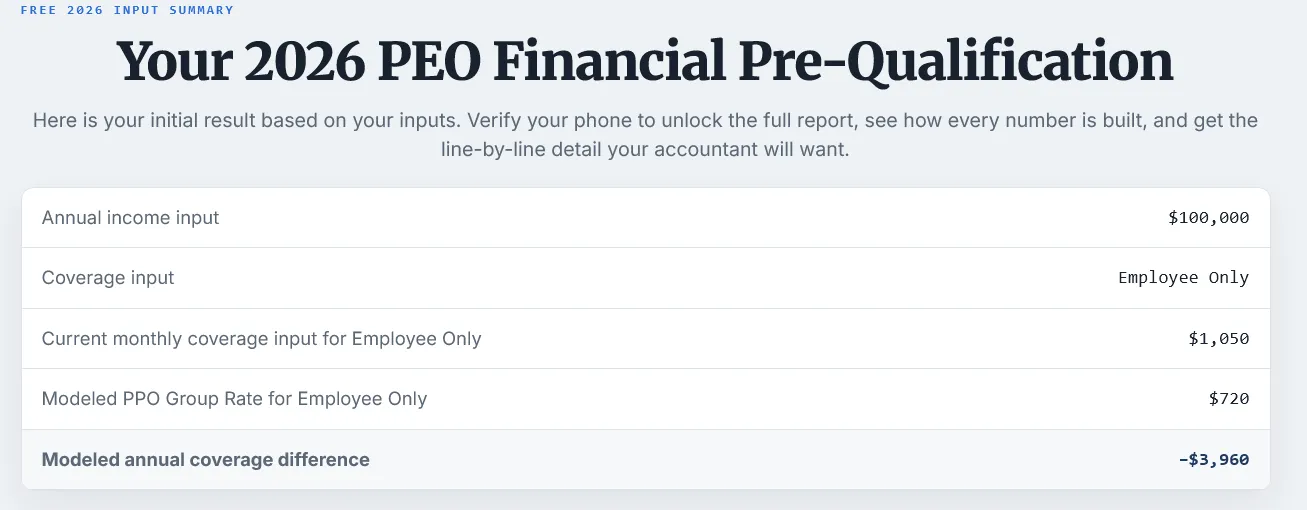
Step 01 / locked preview
The prospect gets a useful answer without a form first.
A directional range appears under the broker brand, with enough detail to make the next step feel earned.
Proofline gives PEO brokers a broker-branded cost flow for serious website visitors. The prospect enters their own inputs, sees whether the PEO math appears worth discussing, and asks for discovery with the broker who gave them the answer.
Your brand gives the cost context. Your discovery call defines the final quote.
Run it like a prospect. It takes about two minutes.
Live engine, sample brand, no account. Free until first verified lead.
This is not a person. It is the AI voice guide your prospects can hear on their report, built to explain what is on the screen, answer Proofline questions, and point the visitor toward discovery under your brand.
A serious prospect comes in trying to understand what a PEO could cost their business. Proofline gives that visitor a broker-branded answer before discovery, then asks for a phone check when the full report is worth unlocking.
The broker receives more than contact information. The broker receives the context behind the question: income, state, team assumptions, current path, and the PEO cost picture the prospect just reviewed.
That is how the discovery call starts with direction instead of basic orientation.
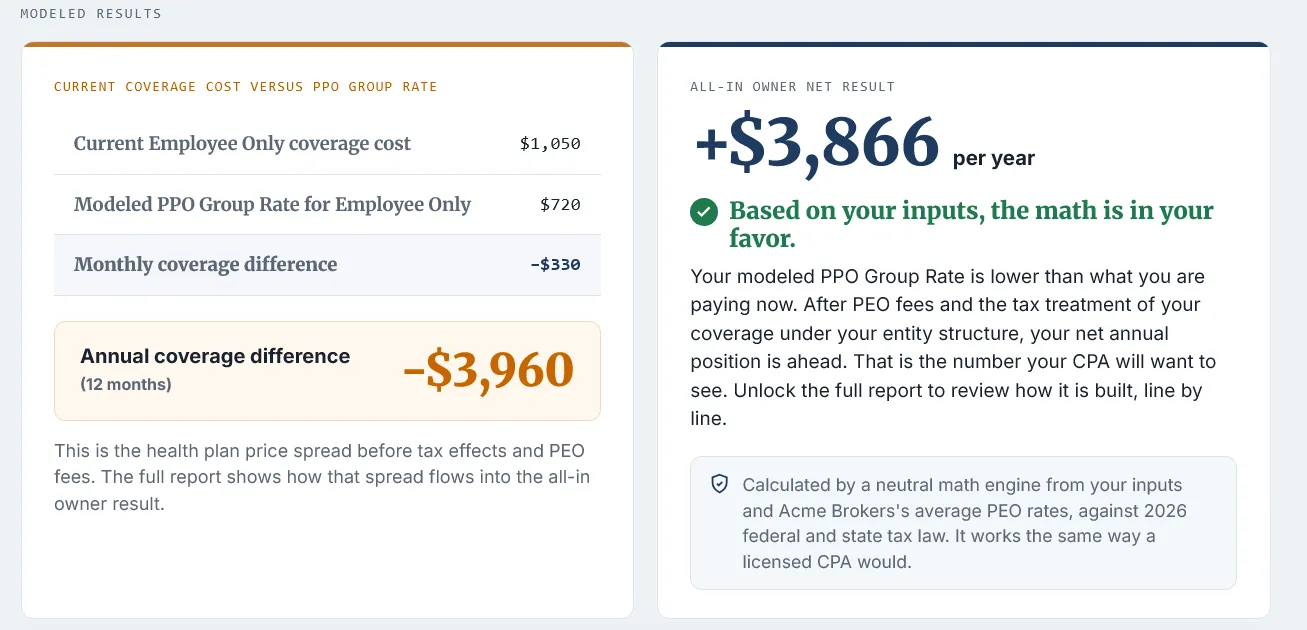
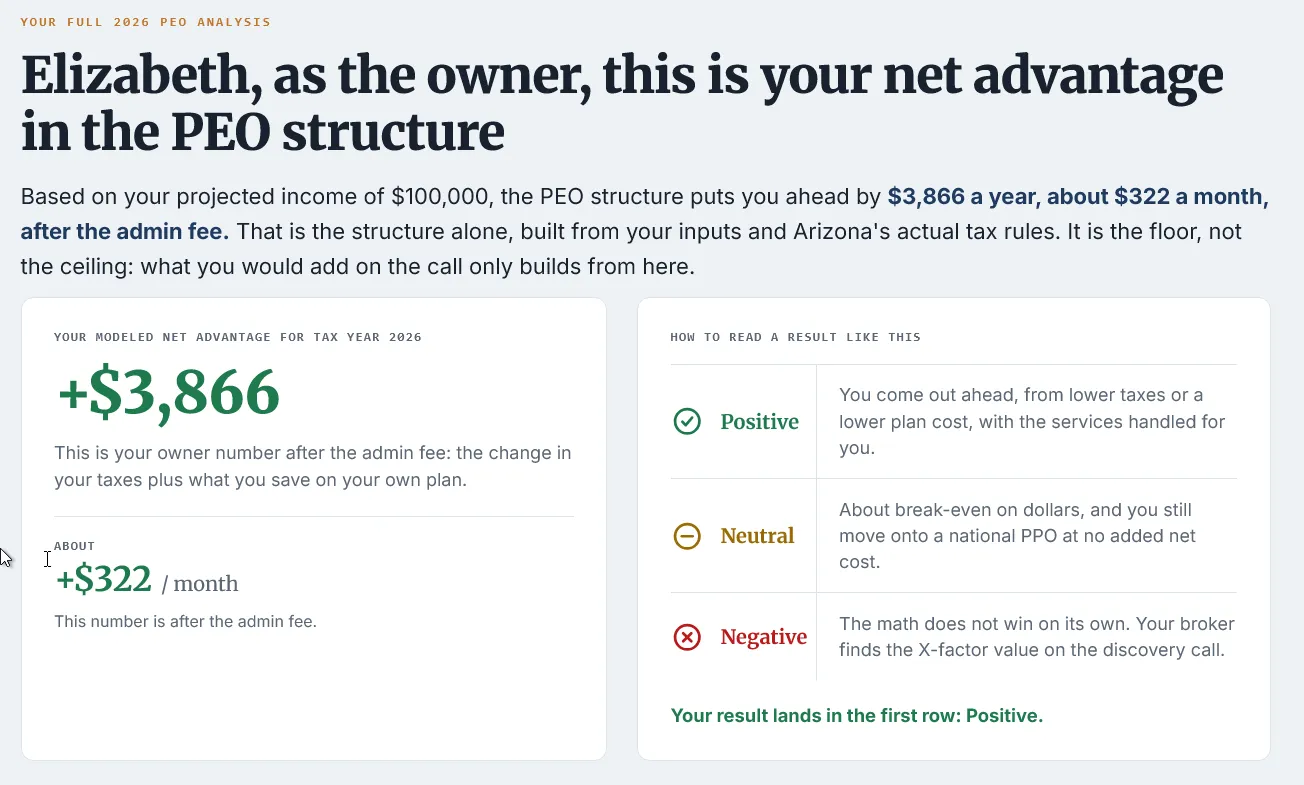
These are the real screens, not mockups. The prospect moves from a useful preview, to the phone-check gate, to the full report, and each step makes the next step feel natural.
A directional range appears under the broker brand, with enough detail to make the next step feel earned.
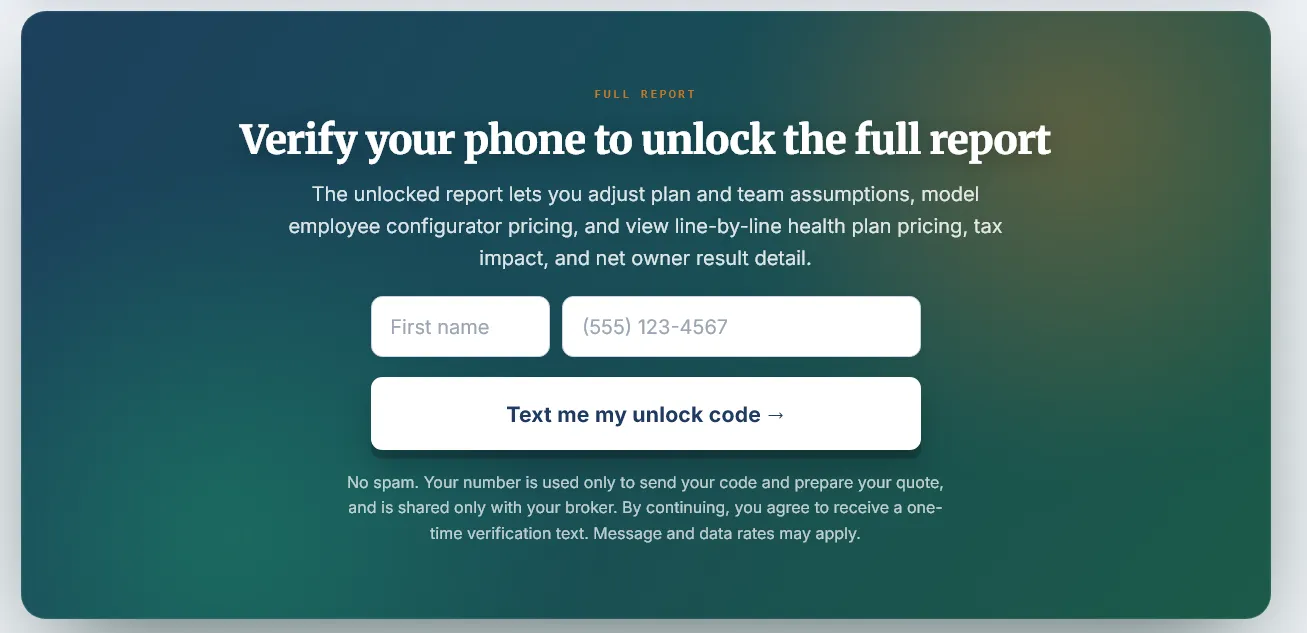
The unlock asks for a phone check at the moment the prospect wants the full cost report.
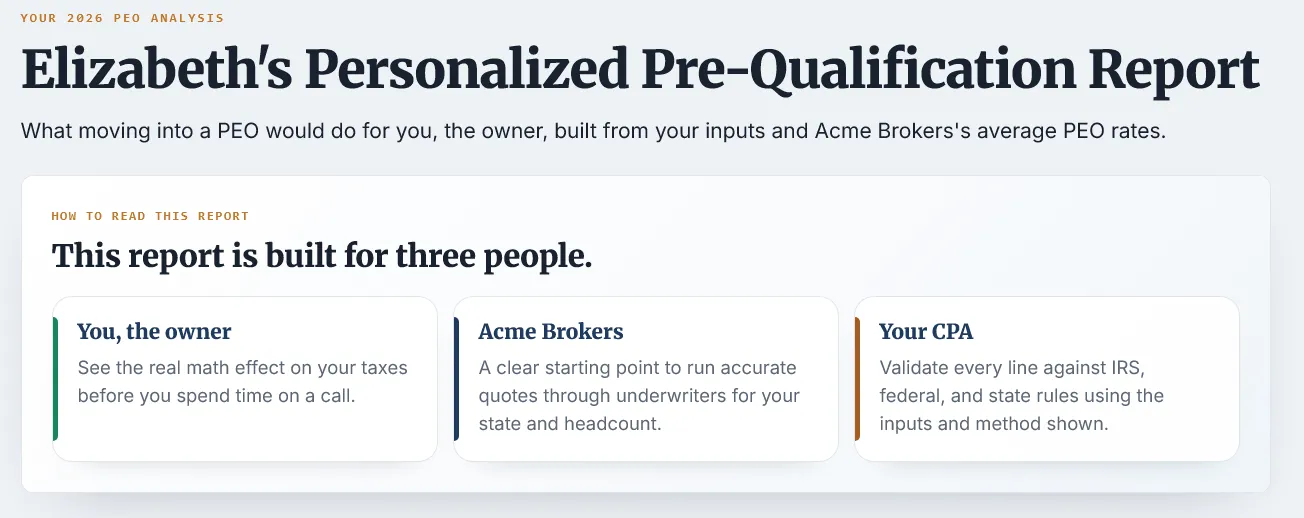
The conversation can start with assumptions, context, and fit questions instead of a cold discovery script.
The moment a prospect sees a cost result is the moment they decide whether to continue. Proofline can add an on-page AI guide, never a person and never an advisor, that reads the screen with them in plain words and helps them understand why the full report and discovery call are worth the next step.
It does not add a step to your funnel. It saves the one that was already leaking.
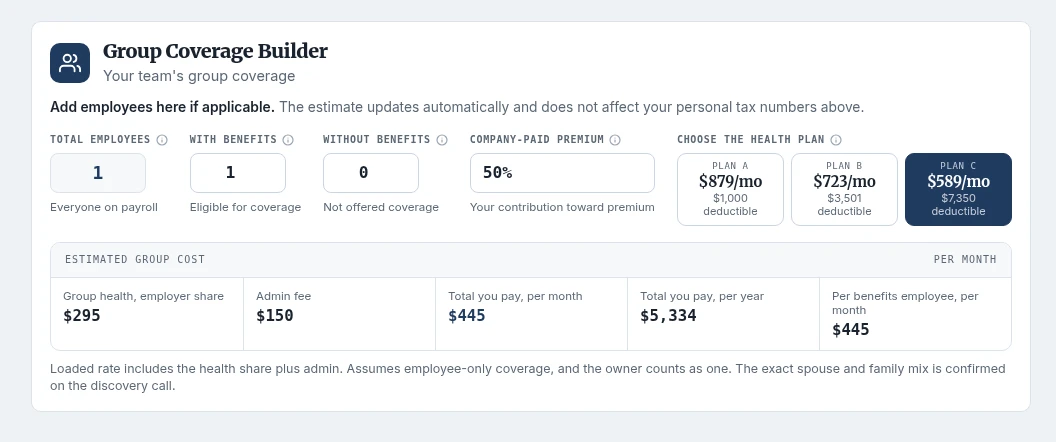
The report does more than compare personal tax impact. It lets the owner model the group coverage assumption that drives the decision: headcount, contribution, and plan. That turns a broad cost question into a specific case you can review together.
They arrive having built their own coverage assumption. Your discovery call starts with their team, their contribution, and their chosen plan already on the screen.
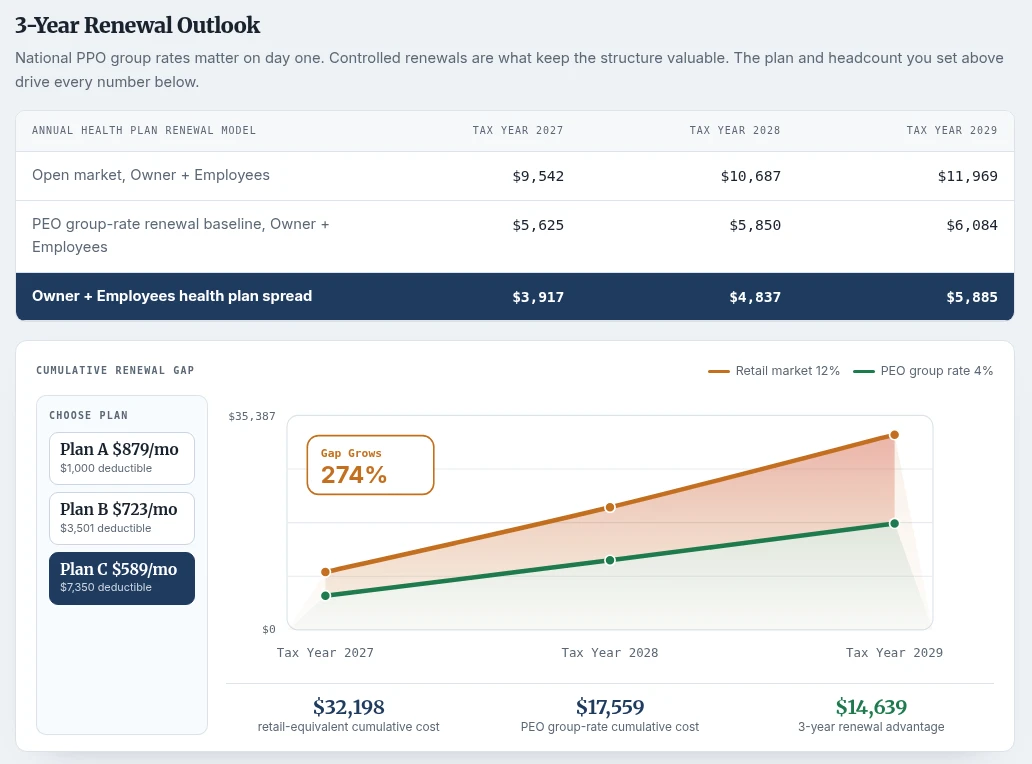
A same-year comparison is only part of the story. Proofline projects the owner's current path against the PEO path over three years, so renewal pressure becomes visible before the call.
The same inputs project three years out, group-rate path against the current-market path. The conversation moves from "is this cheaper today" to "what happens at renewal," the question a PEO broker is built to answer.
Renewal is the one question a retail plan cannot answer, and the reason an owner stays with the broker who put them in a group.
Your real placement assumptions drive the public-facing range.
Drop Proofline where the cost question already exists.
The inputs stay simple enough for a first pass.
Current path and PEO path appear side by side.
The full report opens, and the broker gets the discovery request with context.
A form can collect interest. Proofline creates a broker-branded financial result a skeptical owner can review with their CPA. That is what gives the discovery call a stronger starting point.
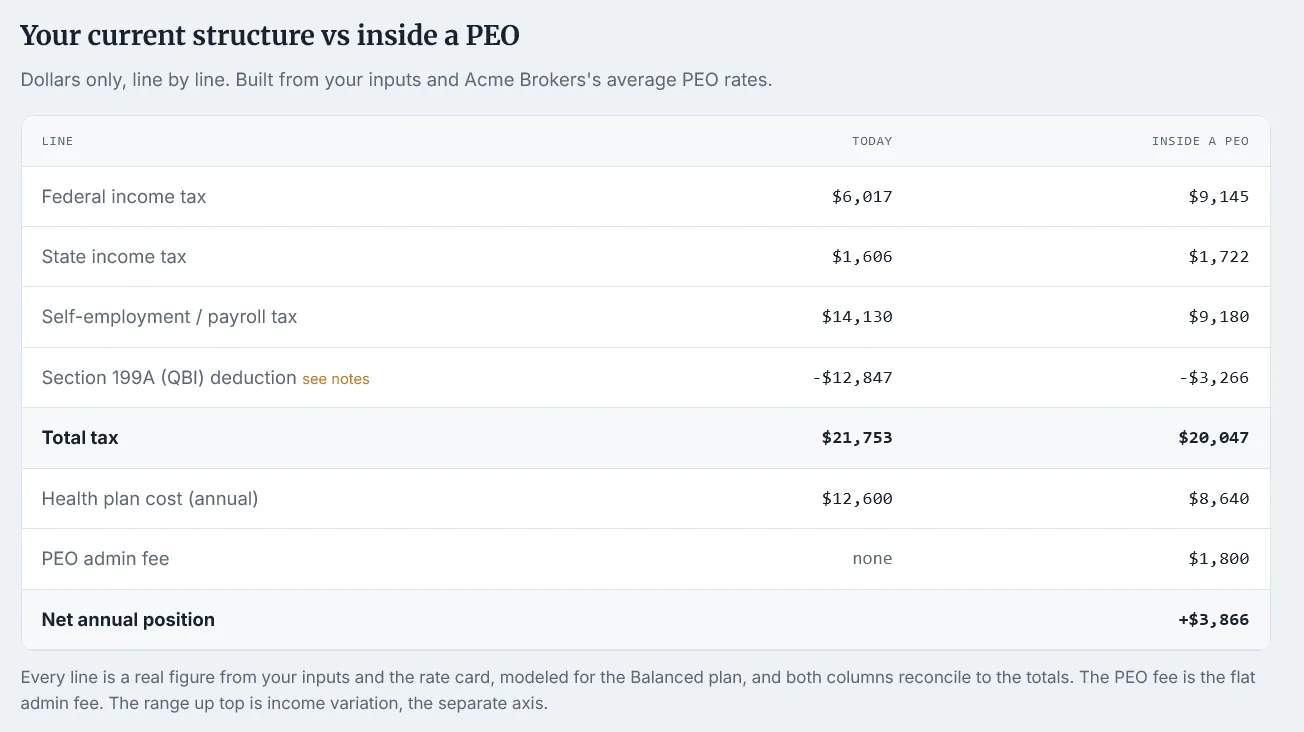
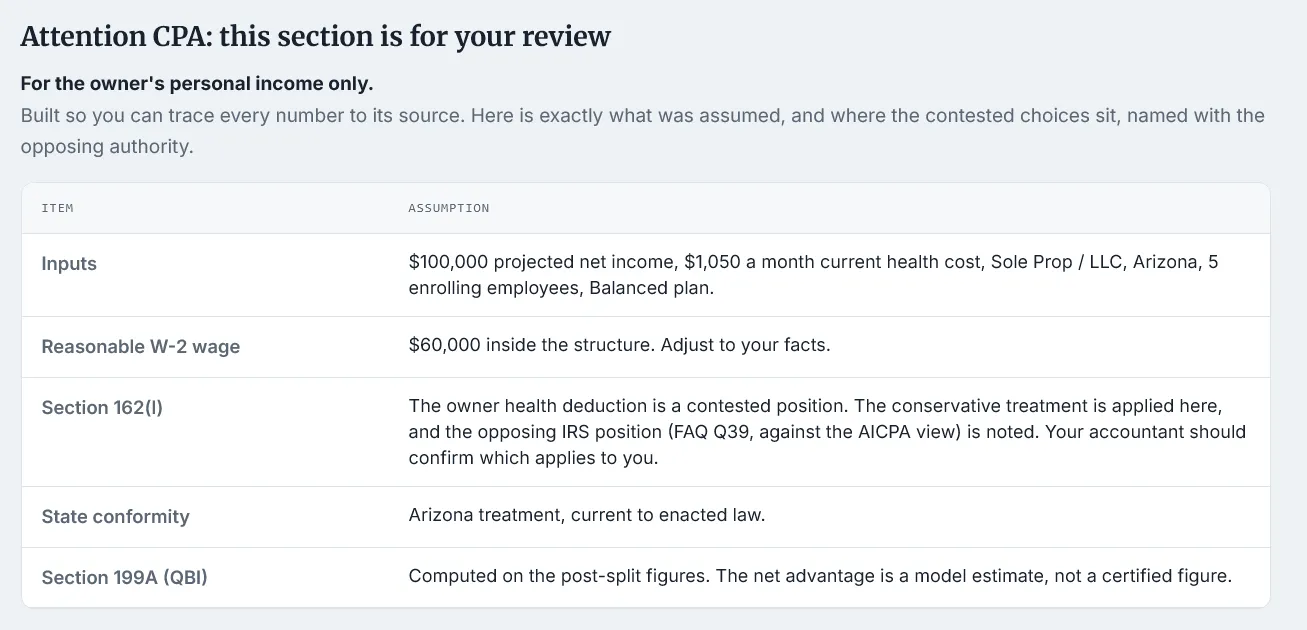
Assumptions and review notes are visible, so the result is not just a claim.
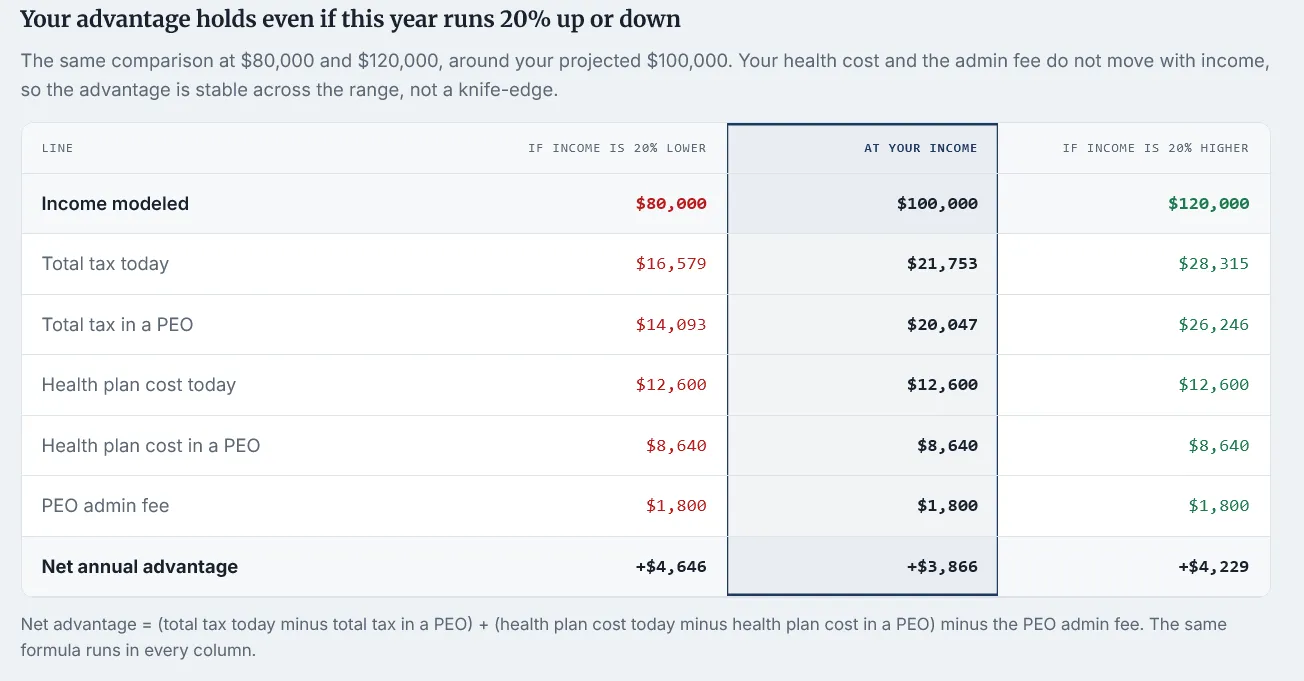
A range keeps the output honest while still giving the prospect a real financial signal.
When the cost picture does not favor a PEO, the report says so. That honesty protects the broker's time and makes a favorable result easier to believe.
It does not require a new marketing strategy. It gives the existing strategy a financial conversion point.
Turn rate pain into a modeled next step.
Give cost traffic a reason to ask for discovery.
Catch owners before renewal pressure turns into shopping.
The click already cost you. Give the visitor a broker-branded cost flow, then let the serious ones verify for the full report.
Give advisors who write life and health coverage a financial proof to send their PEO-curious clients.
Show a client you already cover what a PEO does to their personal taxes.
Hand the partners who already see the financials a clean way to send you a framed case.
Drop it in your renewal emails so owners run their own cost flow before they shop.
Pair every quote with the tax side the prospect has not seen yet.
Catch owners while they are already rethinking their coverage.
Turn attendee interest into verified discovery interest while it is warm.
If you are wondering where the engine belongs, start here. These four examples show Proofline embedded inside performance-style PEO broker sites, with different positioning, page structure, and conversion paths.
Pick the example closest to your brokerage, then open it live.
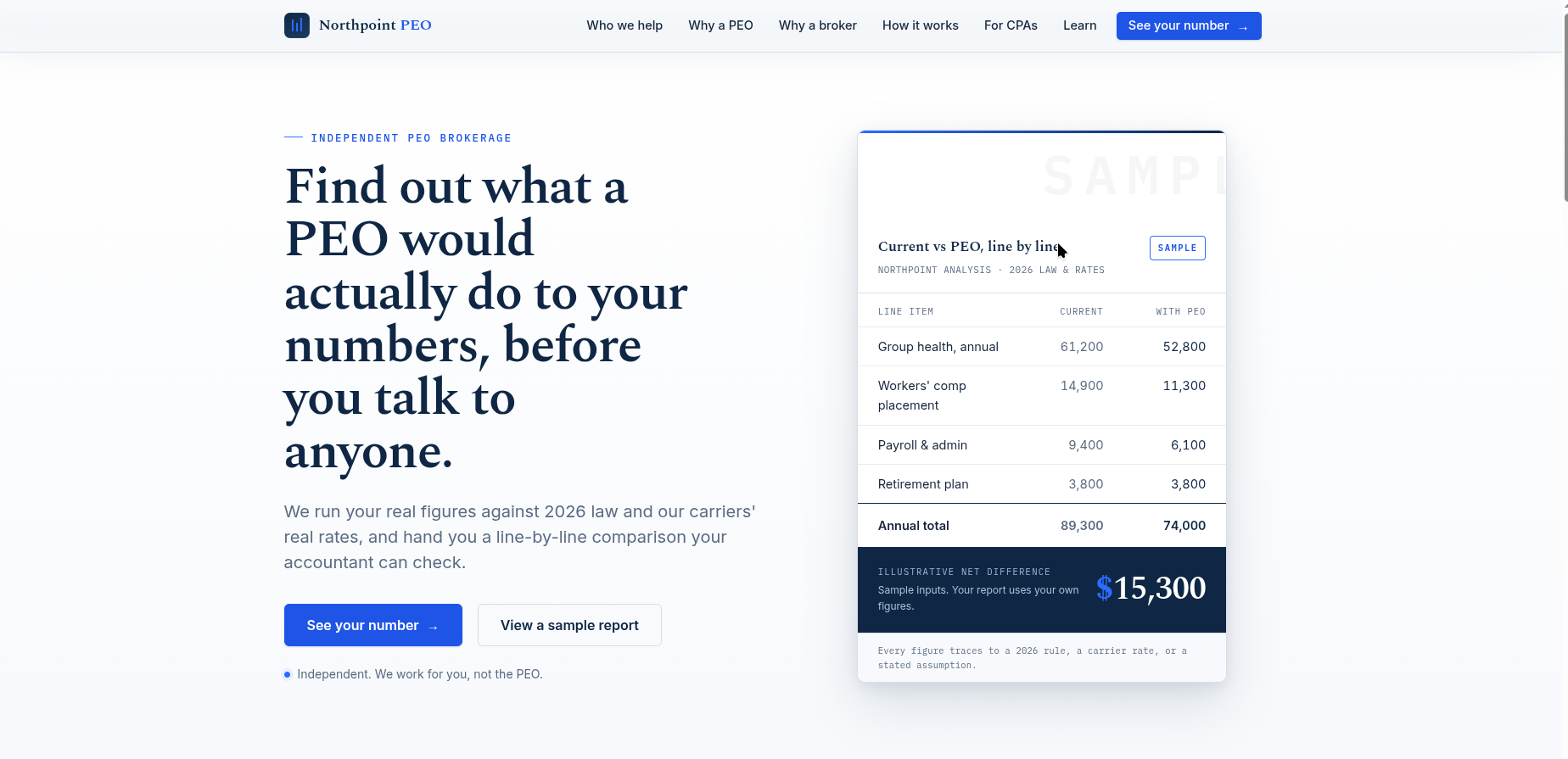 Independent broker
A clean independent-broker site that uses Proofline as the financial proof point inside a broader trust-building page.
Open the live demo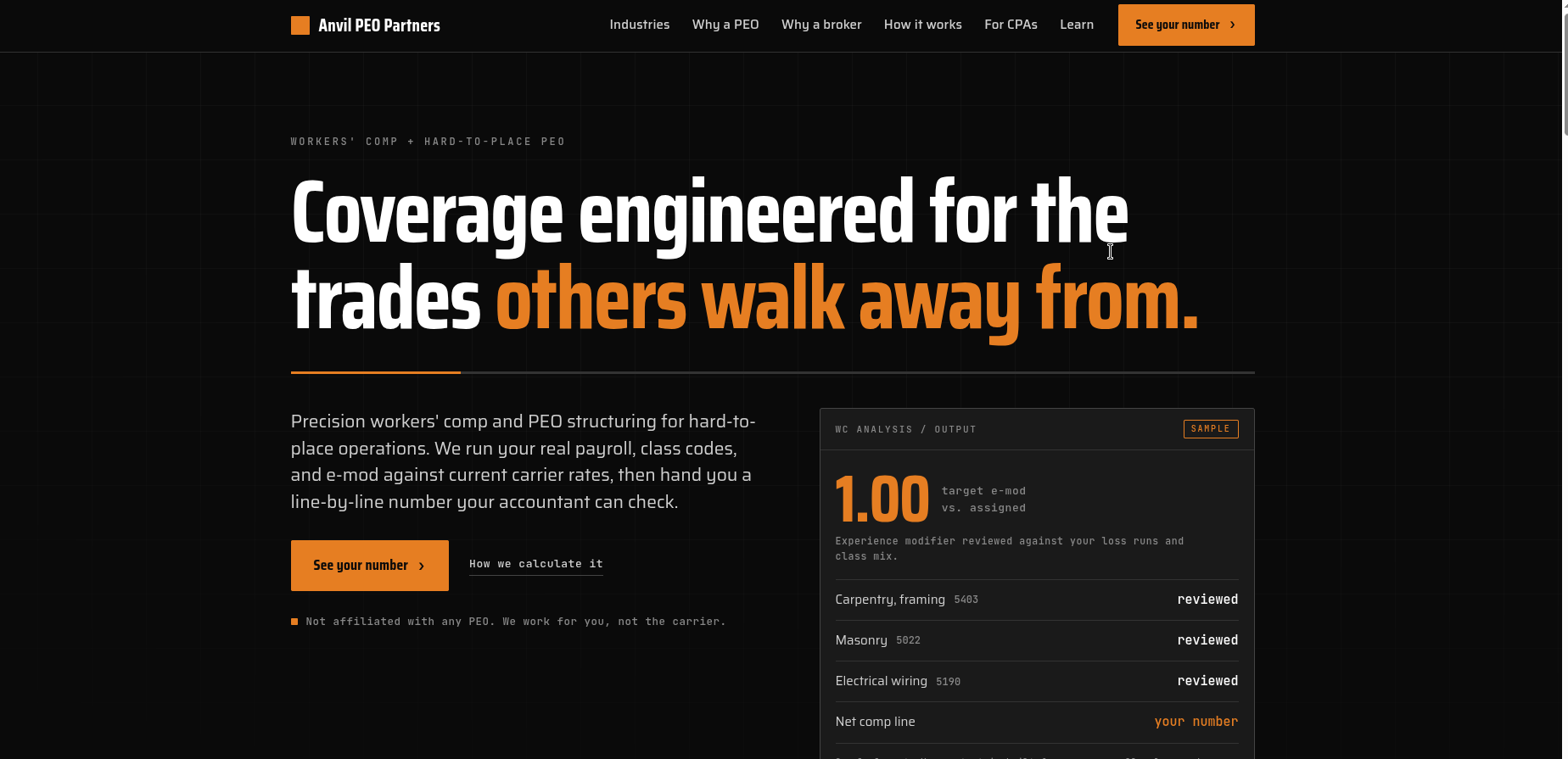 Specialist broker
A sharper specialist positioning route where the engine sits near high-intent cost and fit messaging.
Open the live demo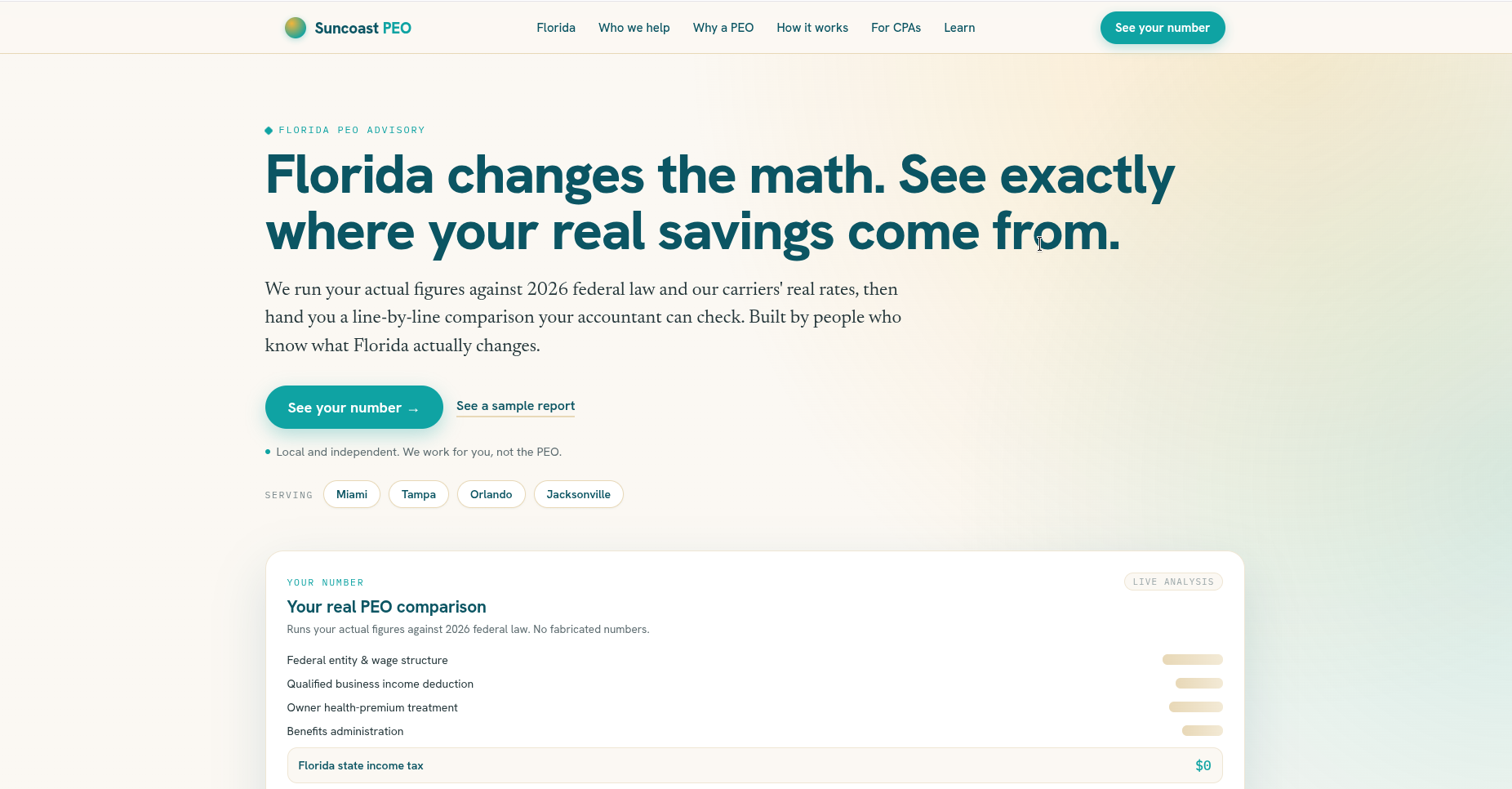 Regional broker
A regional trust site that places the engine inside a local-market growth and comparison story.
Open the live demo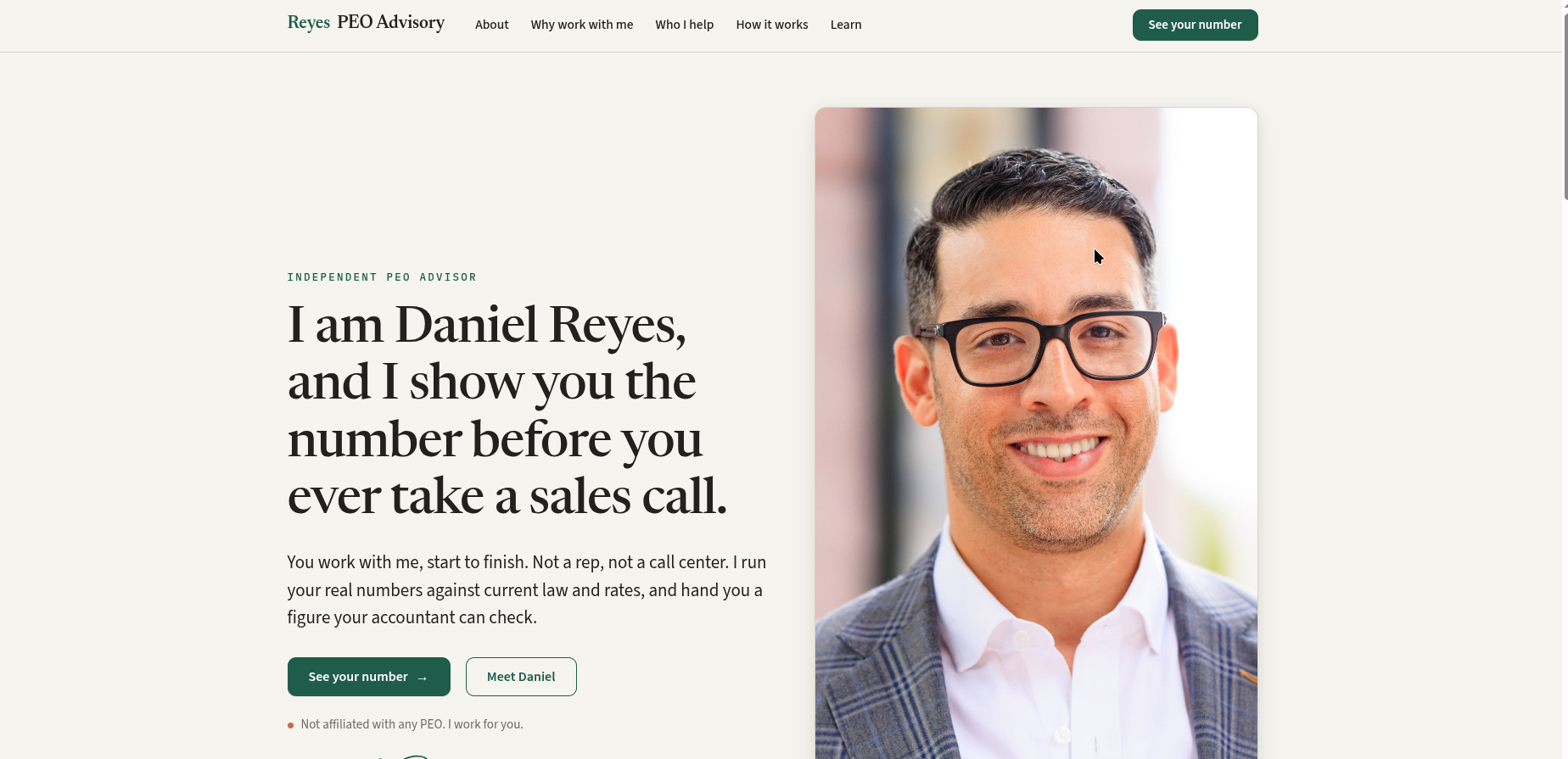 Solo advisor
A lean solo-broker example that uses Proofline to create a serious first conversation from a small site.
Open the live demoClick any card to open the live, interactive demo right here. If your browser blocks the frame, use the Open in new tab link in the modal.
The prospect sees your brand, never ours. You own the lead, the traffic, and the follow-up. It is not a shared marketplace and not a referral pool. Proofline is the invisible layer underneath, and the conversation stays yours.
One embed, your branding, live without rebuilding your site. Drop the snippet where the cost question already lives and it runs under your own domain.
<script
  src="https://static.peotools.com/embed.js"
  data-bid="BROKER_ID"
  async>
</script>Use the sample, watch how the report frames the decision, and decide where it belongs on your site. The fastest way to judge Proofline is to experience the cost question from the prospect's side.
If Proofline looks close to what your site needs, use the audit form. If the conversation is already clearer than the form, use the call request.
Send the page you already use. We will look for where the visitor gets stuck, what the form asks too early, and where Proofline could fit without rebuilding everything.
Use this when you already know a call is easier than another page. Tell us what you want to cover and where leads are slipping away.
Run the sample, then talk through where the cost question already lives on your site. If you want a quieter first step, send the page you use now and we will review it first.
This page is for independent PEO brokers evaluating PEO Tools, Proofline, Proofhouse, DeckGen, or related broker-owned sales infrastructure.
Yes. The primary headings, copy, metadata, schema, and FAQ are authored as static HTML in the page source.
This page is published by PEO Tools, a software platform built for independent PEO brokers.
This is the first proof moment on the broker site: the prospect sees a directional result before the full report is unlocked.
This is the report-level view after the phone check. It gives the broker and prospect a shared result to review on the first conversation.
The prospect sees a branded first-pass page with the initial inputs and a clear reason to continue.
The unlock step appears after the prospect has already seen value, so the phone check is attached to real intent.
The full report gives the broker a better discovery call: the prospect has already seen the case and can review the assumptions.
This section shows the side-by-side financial comparison, which is the proof surface the broker can discuss with the prospect.
This view shows how the report frames assumptions and review notes for a skeptical reader.
The owner adds the team and selects the group plan, and the group cost estimate updates on its own. It does not affect the personal tax comparison above.
The prospect's own inputs drive a three-year projection: the PEO group-rate path against the open market, with the gap compounding year over year.
This section explains why the output is presented as a range and how the prospect should interpret the result.